
How to create web services in php

Web services are software available on internet. They can communicate and provide information to client programs based on XML messaging. In this tutorial we are going to learn about how to create web services in php using NuSOAP.
We will also look in to the basics of web services, SOAP and learn to develop web services in php.

1. Create a MySQL database and a table for books.
2. Insert sample data into the database table.
3.  HTML form to get ISBN number from user.
4. POST form data to a php page and send to web service.
5. Create a web service that connects to MySQL database.
6. Fetch book information based on ISBN number and respond to client.
7. Client receives data from web service and display to user.
web services in php

REST Web Services

web services in php
Suppose you are working on a shopping cart application and need to calculate the shipping charges for the user, so instead you develop a new module to calculate shipping, can use a web service from FedEx and get required information. To fetch information about a book based on ISBN, Amazon book web service can be used.
Web services can be implemented using REST or SOAP techniques. REST means you are using existing services or technologies to get content from internet. Web services can be implemented in different languages and platforms. To use a REST web service you only need the URL or contract of  the web service, parameters and what information is sent back.

eBay web service

eBay has many services that provide information about the products etc. There is  eBay GetSingleItem Web Service, this web service can return product details, shipping cost, summary etc. To get this basic information eBay has provided a basic URL and you have to provide an ItemID.
<?xml version="1.0" encoding="utf-8"?>

<GetSingleItemRequest xmlns="urn:ebay:apis:eBLBaseComponents">
   
   <ItemID>180126682091</ItemID>

</GetSingleItemRequest>

SOAP web services

SOAP or Simple Object Access Protocol is a communication protocol to exchange messages among  computers. To work with SOAP you have to understand different soap elements.
web services in php - soap - envelope

SOAP Envelope

For sending and receiving messages, SOAP has a standard format. SOAP standard is defined by W3C. Every SOAP message is an XML document and has a root element called SOAP Envelope.
SOAP Envelope has an optional tag called header and a mandatory tag called body. Inside body there are all the parameters such as what information you will send to the methods and what information is returned. SOAP is a contract between client and the server.

WSDL or Web Service Description Language

WSDL is a standard by W3C. It serves as a contract between server and client. WSDL contains location of web service, operations and parameters. Operation tags tells that what methods are available. Message tag tells format of messages.
Web services can be implemented by whatever language you want. Every language has set of tools available to implement it. PHP has php SOAP extension. The other popular tool available is called nuSOAP. Let us explore how to create web services in php using NuSOAP library.

Create a MySQL database and table

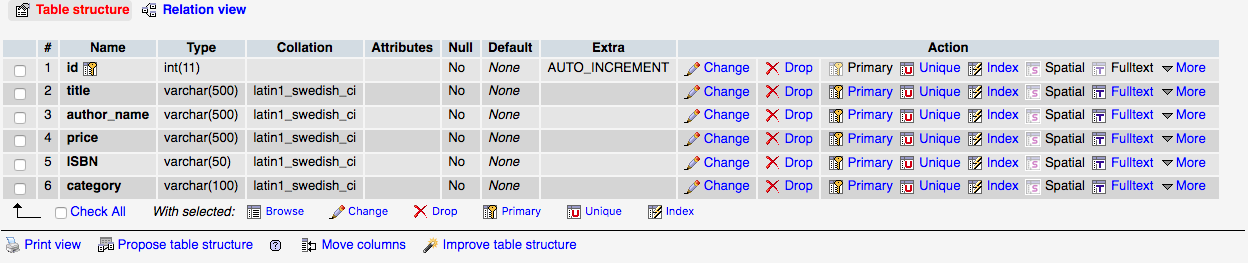
First we are going to create a database and a table for the web service. Open phpMyAdmin on your computer and click SQL tab. Execute following queries.
Create database dbbookstore;


CREATE TABLE `books` (

  `id` int(11) NOT NULL,

  `title` varchar(500) NOT NULL,

  `author_name` varchar(500) NOT NULL,

  `price` varchar(500) NOT NULL,

  `isbn` varchar(50) NOT NULL,

  `category` varchar(100) NOT NULL

) ENGINE=InnoDB AUTO_INCREMENT=11 DEFAULT CHARSET=latin1;

--
-- Dumping data for table `books`
--

INSERT INTO `books` (`id`, `title`, `author_name`, `price`, `isbn`, `category`) VALUES

(1, 'C++ By Example', 'John', '500', 'PR-123-A1', 'Programming'),

(2, 'Java Book', 'Jane davis', '450', 'PR-456-A2', 'Programming'),

(3, 'Database Management Systems', 'Mark', '$75', 'DB-123-ASD', 'Database'),

(4, 'Harry Potter and the Order of the Phoenix', 'J.K. Rowling', '650', 'FC-123-456', 'Novel'),

(5, 'Data Structures', 'author 5', '450', 'FC-456-678', 'Programming'),

(6, 'Learning Web Development ', 'Michael', '300', 'ABC-123-456', 'Web Development'),

(7, 'Professional PHP & MYSQL', 'Programmer Blog', '$340', 'PR-123-456', 'Web Development'),

(8, 'Java Server Pages', 'technical authoer', ' $45.90', 'ABC-567-345', 'Programming'),

(9, 'Marketing', 'author3', '$423.87', '456-GHI-987', 'Business'),

(10, 'Economics', 'autor9', '$45', '234-DSG-456', 'Business');

ALTER TABLE `books` ADD PRIMARY KEY (`id`);

ALTER TABLE `books` MODIFY `id` int(11) NOT NULL AUTO_INCREMENT,AUTO_INCREMENT=11;
web services in php

web services in php

Create project folder php-webservices

Open www or root directory of your WAMP or XAMPP installation. Create a folder php-webservices. Download NuSOAP from Sourceforge website. Extract and copy lib folder, paste it in folder you have created above.

Create database connection file using PDO

Create a file named dbconn.php and add php PDO code to connect to database.
<?php

$host         = "localhost";

$username     = "root";

$password     = "root";

$dbname       = "dbbookstore";

try {

    $dbconn = new PDO('mysql:host=localhost;dbname=dbbookstore', $username, $password);

} catch (PDOException $e) {

    print "Error!: " . $e->getMessage() . "<br/>";

    die();

}

Create a Books Web Service using NuSOAP

Create a file named webservice-server.php. To access book information from database you need to include dbconn.php. On successful connection to database this file creates a database connection object.
Include nusoap.php file from lib directory. To create a server side web service new nusoap_server()method is called, that returns soap server object.
<?php

 /** 

  @Description: Book Information Server Side Web Service:
  This Sctript creates a web service using NuSOAP php library. 
  fetchBookData function accepts ISBN and sends back book information.

  @Author:  http://programmerblog.net/

  @Website: http://programmerblog.net/

 */

 require_once('dbconn.php');

 require_once('lib/nusoap.php'); 

 $server = new nusoap_server();

/* Fetch 1 book data */
function fetchBookData($isbn){

  global $dbconn;

  $sql = "SELECT id, title, author_name, price, isbn, category FROM books where isbn = :isbn";

  // prepare sql and bind parameters
    $stmt = $dbconn->prepare($sql);

    $stmt->bindParam(':isbn', $isbn);

    // insert a row
    $stmt->execute();

    $data = $stmt->fetch(PDO::FETCH_ASSOC);

    return json_encode($data);

    $dbconn = null;

}

$server->configureWSDL('booksServer', 'urn:book');

$server->register('fetchBookData',
      array('isbn' => 'xsd:string'),  //parameter
      array('data' => 'xsd:string'),  //output
      'urn:book',   //namespace
      'urn:book#fetchBookData' //soapaction
      );  

$server->service(file_get_contents("php://input"));

?>
A function fetchBookData($isbn){ … } is created. This function will acts as web service. It accepts a parameter as $isbn.
To use database connection object from dbconn.php$dbconn is declared as a global object. A query is defined to fetch a book record with $isbn as named parameter.
A prepared statement is created using PDO Prepare method. bindParam method binds $isbn to ISBN parameter. execute method runs the query and database record is returned to  $data variable. To fetch data into an array fetch() method is used. Data is json encoded and returned to client web service.

Configure a WSDL for web service

To configure a WSDL, configureWSDL method is used.
$server->configureWSDL('booksServer', 'urn:book');
This method takes two parameters. First parameter is name of WSDL document bookServer and second parameter is the namespace. It is Universal Resource Identifier, it differentiates WSDL from other WSDL documents.
$server->register('fetchBookData',

      array('isbn' => 'xsd:string'),  //parameter

      array('data' => 'xsd:string'),  //output

      'urn:book',   //namespace

      'urn:book#fetchBookData' //soapaction

      );  

$server->service(file_get_contents("php://input"));
The code snippet above registers fetchBookData function as a web service. The other information to provide are the input and output parameters. This web service takes a string parameter as input and returns a string as an output.
xsd means XML schema is used. With XML schema we have pre-defined data types such as integer, string, float etc. Namespace and name of the method is provided.

Display WSDL document

Open you web browser and type following URL in the browser.
http://localhost/php-webservices/webservice-server.php
web services in php wsdl
You can see a nicely formatted page like above. If you click on WSDL  link, displays a WSDL.
web services in php nusoap WSDL
web services in php nusoap wsdl

In the bottom of this document,  inside service tag, name of web service in mentioned as a parameter. SOAP address tag’s location parameter contains the location of the web service. An operationtag contains name of fetchBookData web service. fetchBookDataRequest message tag specifies that web service requires ISBN prameter as a string. fetchBookDataResponse tag specifies that web service returns a string as output to client. Now this web service is ready and waiting for a client web service to contact it.
Client web service can be implemented in any language. A client needs to send a SOAP message in a particular format defined by WSDL.

Create HTML form to get ISBN form user

After setup of server let us work on client side. HTML form is created to get ISBN from user and send it to server. Create a file webservice_client.php. Add following code to create a form.
<div class='row'>

  <form class="form-inline" method = 'post' name='form1'>

   <?php if($error) { ?> 

      <div class="alert alert-danger fade in">

      <a href="#" class="close" data-dismiss="alert">&times;</a>
      <strong>Error!</strong>&nbsp;<?php echo $error; ?> 

         </div>

   <?php } ?>

     <div class="form-group">

       <label for="email">ISBN:</label>

       <input type="text" class="form-control" name="isbn" id="isbn" placeholder="Enter ISBN">

     </div>

     <button type="submit" name='sub' class="btn btn-default">Fetch Book Information</button>

   </form>

  </div>

web services in php
A text box with a button is displayed. When user enters ISBN into this box and clicks submit, data is sent to server.
<?php

  ini_set('display_errors', true);
  
  error_reporting(E_ALL);

  require_once('lib/nusoap.php');
  
  $error  = '';
  
  $result = array();
  
  $wsdl = "http://localhost:8888/php-webservices/webservice-server.php?wsdl";
  
  if(isset($_POST['sub'])){

    $isbn = trim($_POST['isbn']);

    if(!$isbn){

      $error = 'ISBN cannot be left blank.';
    }

    if(!$error){

      //create client object
      $client = new nusoap_client($wsdl, true);

      $err = $client->getError();

      if ($err) {

        echo '<h2>Constructor error</h2>' . $err;

          exit();
      }

      try {

        $result = $client->call('fetchBookData', array('PR-123-456'));

        $result = json_decode($result);

        }catch (Exception $e) {

          echo 'Caught exception: ',  $e->getMessage(), "\n";
       }
    }
  }

?>
In the code above we first include nusoap from lib directory. Then create a $WSDL variable and assigned it the path of WSDL. Next we check if user has entered an ISBN and submitted the form. A client object of nu_soap is created using
$client = new nusoap_client($wsdl, true);
Two parameters are passed to this functions , first is path of WSDL and second argument is true that tells that the first parameter is a WSDL. We use client object’s call method to call a web service.
$result = $client->call('fetchBookData', array('PR-123-456'));

$result = json_decode($result);
call method accepts name of the web service method and an array containing the parameters such as ISBN number. Response is returned in $result variable and is JSON decoded.

Display web service result to user

After HTML form, add HTML table to display result returned from web service.
 <h2>Book Information</h2>

<table class="table">

  <thead>

    <tr>

      <th>Title</th>

      <th>Author</th>

      <th>Price</th>

      <th>ISBN</th>

      <th>Category</th>

    </tr>

  </thead>

  <tbody>

  <?php if(count($result)){ 

      for ($i=0; $i < count($result); $i++) { ?>

        <tr>

          <td><?php echo $result->title; ?></td>

          <td><?php echo $result->author_name; ?></td>

          <td><?php echo $result->price; ?></td>

          <td><?php echo $result->isbn; ?></td> 

          <td><?php echo $result->category; ?></td>

        </tr>

             <?php 

   }

  } else {  ?>

   <tr>

          <td colspan='5'>Enter ISBN and click on Fetch Book Information button</td>

        </tr>

  <?php } ?>

  </tbody>

</table>
A table is added with Title, Author, Price, ISBN and Category table cells. If result is returned from web service it is displayed to user in a loop.

Web services in php – web service response


Summary

To summarize this tutorial you have learned about  basics of web services in php and created a web service using NuSOAP library. Data is fetched from MySQL database by web service and displayed to user. You can download complete source code with MySQL database dump.

Comments

Popular posts from this blog

October CMS E-Commerce Tutorial: GoT White Walkers Protection Store

As many of you probably know, Game of Thrones Season 6 is starting next April 24th. Now I recently introduced myself on this blog , but forgot to mention that I'm, like millions of others, a shameless GoT fan . When our content guy asked me to craft a post showing how the easy e-commerce integration we brag about would work with October CMS, I immediately picked GoT as a theme for the demo. ​ So in this post, I'm going to show you how to set up a store selling defense against the imminent White Walkers invasion. Because WINTER IS COMING big time, you know. ​ ​ More specifically, I'll provide a step-by-step e-commerce tutorial explaining how to integrate our shopping cart platform to an October CMS site. Let's get into it. ​ What is October CMS ​ We've been hearing about October CMS from developers here and there for a while now. This free, open-source CMS platform is the brainchild of fellow Canadian Alexey Bobkov and Australian Samuel Georges. It...

Sublime vs Dreamweaver

13 REASONS TO USE OF SUBLIME TEXT OVER DREAMWEAVER 17 MARCH, 2014 BY TOM ELLIOTT I started writing this post over a year ago but back then it was entitled something along the lines of ‘Reasons why I use Dreamweaver over code editors’. This was biased, as I hadn’t properly explored other code editors like Coda, Sublime Text or Notepad++. So, wanting to write an objective post from a web developers point of view, and because I had heard many good things about it, I setup Sublime Text 2 and dove straight in. I’m glad I did because it quickly became obvious that my presumed reasons for Dreamweaver’s superiority were just wrong. We are all creatures of habit to a greater or lesser degree and when we develop workflows to help make our lives easier, we can get entrenched in the view that these honed practices are superior. It’s not our fault, confirmation bias is supposedly  programmed in our DNA . Even so, it’s healthy to try and keep questioning and challenging ourselves, espe...

JazzCash Mobile Account

  JazzCash Mobile Account Help Center  > JazzCash Mobile Account What is JazzCash mobile account? JazzCash Mobile Account is an actual bank account that is tagged with your mobile number and can be operated through your phone. Through this Mobile Account you can enjoy complete freedom of accessing financial services anywhere, anytime! More importantly, you don’t have to rely on traveling to a Bank branch, wait at queues or complete any documentation. Mobile Account menu works on all types of mobile phones – smart phone is not required. Customers can make deposits or withdrawals through any Mobilink Microfinance Bank Branch, Mobilink Franchise, Mobilink Business Center and Jazzcash Agents spread across Pakistan. JazzCash Mobile App In line with the continuous digitization of its services to meet demands of growing number of smartphone users, JazzCash is proud to announce Android based App for its Mobile Account users. The App offers a user friendly inte...